Stop retyping the same emails, signatures, and replies. Create a short keyword and expand it into rich formatted text — anywhere on the web, instantly.
✅ Completed: API integration
🔄 In progress: UI review
📅 Next up: QA testing
Let me know if you have any questions!
— Alex
Free to get started
Works in every text field
★★★★★Loved by professionals
Syncs across all devices
How it works
Three steps. Infinite time saved.
Typsnip is designed to be invisible until you need it — then it's instant.
1
Create your shortcut
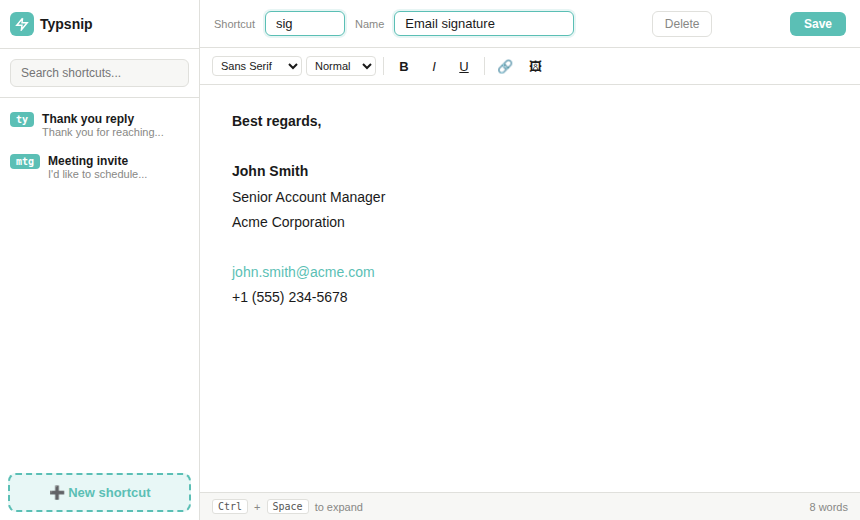
Open Typsnip, click "+ New", give it a keyword like sig and compose your full rich-text content in the editor.
2
Type it anywhere
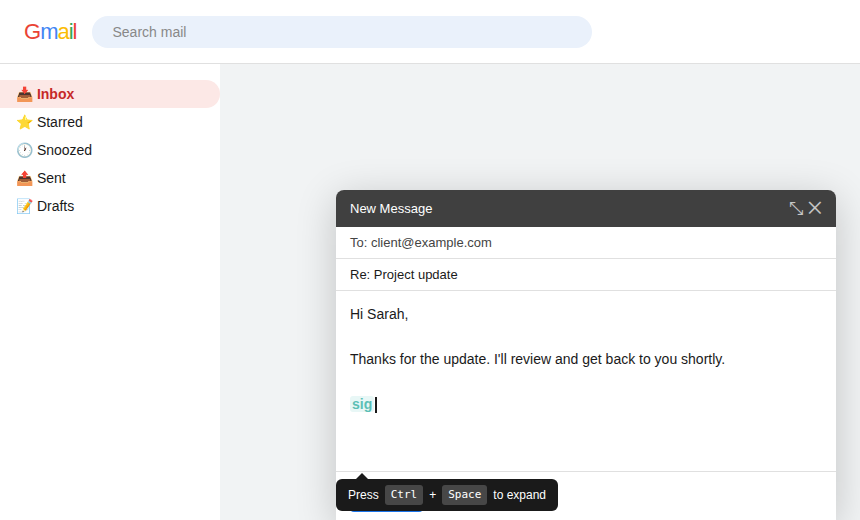
Go to any website — Gmail, Outlook, LinkedIn, Notion, Slack. Click into any text field and type your shortcut keyword.
3
Press Ctrl+Space
Hit Ctrl+Space and your shortcut expands instantly into the full formatted text.
Features
Everything you need. Nothing you don't.
Typsnip is focused on doing one thing exceptionally well.
Rich text formatting
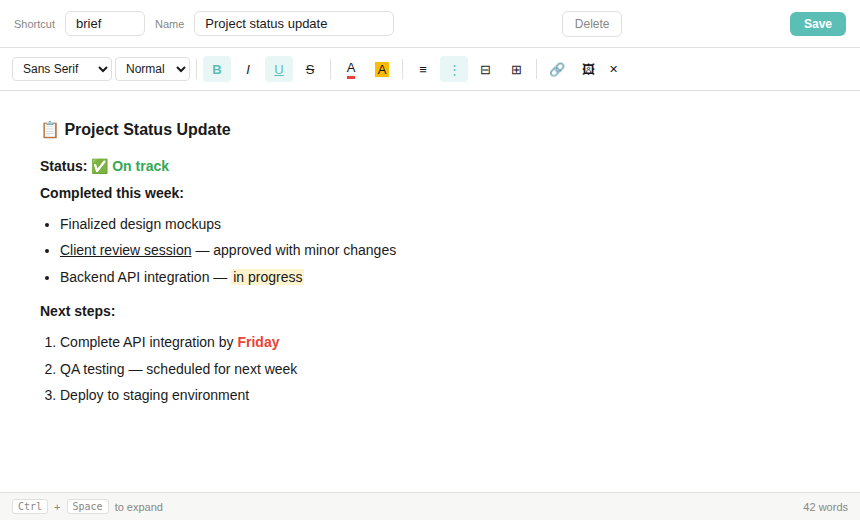
Bold, italic, underline, font size, text color, highlights, numbered lists, bullet points, links, and images. Your shortcuts look exactly how you want them.
Images in shortcuts
Embed images directly in your shortcuts. Perfect for signatures with logos, templates with diagrams, or any content that needs visuals. Available on paid plans.
Instant expansion
No menus, no clicking. Type your shortcut, press Ctrl+Space, and it expands in milliseconds. Completely non-intrusive to your workflow.
Cloud sync
Your shortcuts are saved to the cloud and available on every device you're logged into. Switch from laptop to desktop to phone seamlessly.
Works everywhere
Typsnip injects into every text field on every website — email clients, social media, CRMs, project tools, and plain text inputs alike.
Private & secure
Your shortcut content is stored in your personal account only. We never read, sell, or share your data. Secured by Firebase with industry-standard encryption.
No prefix required
Use any keyword you want — with or without a prefix like / or ;. Typsnip only expands when you press Ctrl+Space, so accidental triggers never happen.
Simple by design
Most productivity tools try to do everything. Typsnip does one thing — and does it instantly. No dashboards to navigate, no AI to prompt, no workflow to redesign. Create a shortcut, type it, done. That's the whole app.
Compatibility
Works in the tools you already use
Gmail
Outlook
Google Docs
Notion
LinkedIn
Slack
Zendesk
HubSpot
Salesforce
Twitter / X
WhatsApp Web
+ any website
Pricing
Start free. Upgrade when you're ready.
No credit card needed to get started. Upgrade any time.
MonthlyAnnualSave up to 17%
Free
$0
Forever free · 1 device
Get started and see if Typsnip fits your workflow.
Paid plans renew automatically each billing period until you cancel. Cancel anytime in the extension (Account tab, Manage subscription) and keep access until the end of the period you paid for. No refunds for partial periods. See the Terms of Service.
What people say
Loved by people who type for a living
★★★★★
I send 80+ emails a day in customer support. Typsnip cut my response time in half. I set up 20 shortcuts in the first hour and never looked back.
S
Sarah K.
Customer Success Manager
★★★★★
My email signature used to take me 30 seconds every time. Now it's one keystroke. Sounds small but across 50 emails a day that's real time saved.
M
Marcus R.
Freelance Consultant
★★★★★
The rich text support is what sold me. Other expanders give you plain text. With Typsnip my templates look exactly like I designed them — bold, colours, lists and all.
J
Jamie L.
Sales Executive
FAQ
Questions answered
Does Typsnip work in Gmail and Google Docs?
Yes. Typsnip works in any text field in Chrome — Gmail, Google Docs, Outlook, LinkedIn, Notion, Slack, Salesforce, and thousands of other sites. If you can click into a text area, Typsnip works there.
What does "rich text" mean exactly?
Rich text means your shortcuts can include bold, italic, underline, strikethrough, different font sizes, text colors, background highlights, bullet lists, numbered lists, clickable links, and even images. Plain text shortcuts like those in basic expanders look like stripped-down emails — Typsnip shortcuts look like you actually wrote them.
Will my shortcuts trigger accidentally while I'm typing?
No. Typsnip only expands when you press Ctrl+Space after your shortcut keyword. It will never trigger mid-sentence or while you're typing something else. You're always in full control.
Can I use it on multiple computers?
Yes. All your shortcuts are saved to the cloud and synced to every device you sign into. Install Typsnip on your work laptop, home desktop, and they all share the same shortcuts automatically.
Can I cancel my Pro subscription anytime?
Absolutely. You can cancel anytime from the Account tab inside the extension. Your Pro access continues until the end of the current billing period, then your account reverts to the Free tier. No penalties, no questions asked.
Is my shortcut content private?
Yes. Your shortcuts are stored in a private database tied to your account only. Typsnip employees cannot read your shortcuts. We do not sell or share your data with third parties. See our Privacy Policy for full details.
What is Typsnip?
Typsnip is a Chrome extension that lets you save frequently used text as shortcuts. Type the shortcut keyword anywhere in Chrome, press Ctrl+Space, and it instantly expands into your full formatted text — complete with bold, italic, colors, lists, and images.
Are my shortcuts private?
Yes. Your shortcuts are stored in your personal account only. We never read, share, or sell your content. Each account's data is isolated and secured by Firebase with industry-standard encryption.
Does Typsnip use AI?
No. Typsnip is intentionally simple — it expands exactly what you wrote, nothing more. No AI generation, no suggestions, no unpredictable outputs. Just your words, ready when you need them.
Is Typsnip safe to install?
Yes. Typsnip only reads text fields on pages where you actively use it. It does not collect browsing data, track websites you visit, or send any page content to our servers. Only your shortcut content — which you create — is stored in your account.
Is there a free plan?
Yes. The free plan includes 40 shortcuts with full rich text support on 1 device, with no time limit. There is also a Free with Ads plan that gives you 70 shortcuts in exchange for seeing occasional ads in the extension.
Can I share shortcuts with my team?
Yes — multiple people can log into the same account and share the same shortcuts. The number of simultaneous devices depends on your plan, up to 30 on Pro Enterprise.
What happens to my shortcuts if I downgrade my plan?
Your shortcuts are never deleted. If you have more shortcuts than your new plan allows, the oldest ones stay active and the rest are temporarily deactivated. They reactivate instantly if you upgrade again.
Do you offer refunds?
We do not offer refunds for partial billing periods. If you cancel, you retain full access until your period ends. In the event of a full service shutdown, paid subscribers are eligible for a prorated refund.
How do I create my first shortcut?
Click the Typsnip icon in your Chrome toolbar to open the editor. Click + New shortcut, enter a short keyword (e.g. sig), give it a name, type your content in the editor, and click Save. Your shortcut is ready to use immediately.
How do I expand a shortcut?
Click into any text field on any website — Gmail compose, LinkedIn message box, a support ticket, anywhere. Type your shortcut keyword (e.g. sig) and press Ctrl+Space. Your full formatted text appears instantly in place of the keyword.
Can I format text with bold, colors, and other styles?
Yes. The Typsnip editor supports bold, italic, underline, strikethrough, text color, highlight, font family, font size, numbered lists, bullet points, indentation, and links. Image upload is available on paid plans. Use the toolbar above the editor to apply formatting just like in a word processor.
How do I use labels to organize my shortcuts?
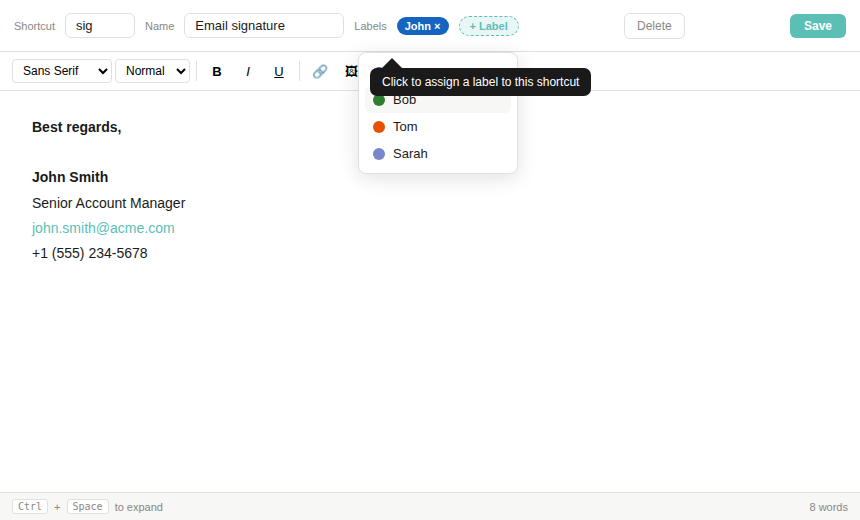
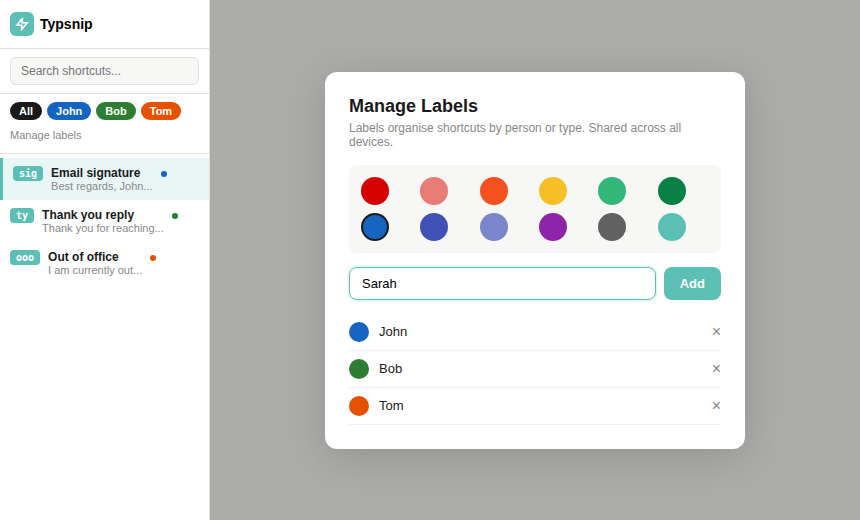
Labels are available on paid plans. Open the editor and click Manage labels above the shortcuts list. Choose a color, type a label name, and click Add. To assign a label to a shortcut, open it and click + Label in the top bar. Filter your shortcuts by clicking the label buttons above the list.
What is the image size limit and how does auto-resize work?
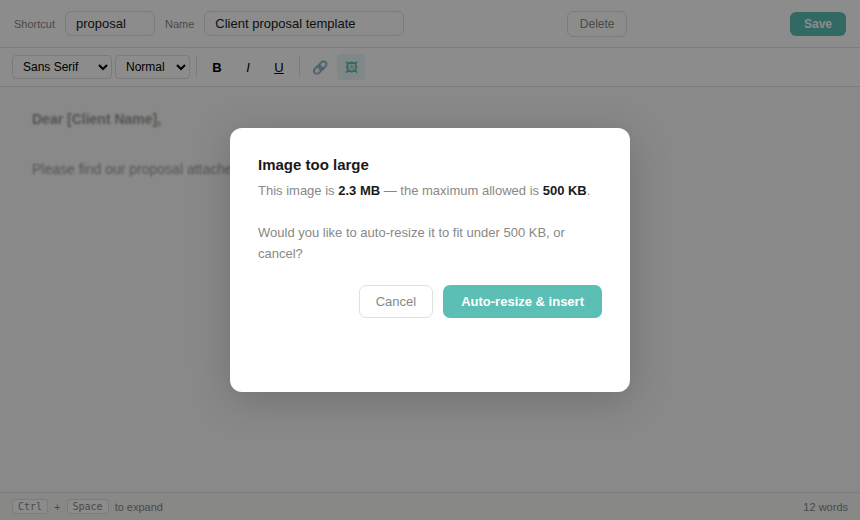
Images must be under 500 KB. When you select an image that exceeds the limit, Typsnip shows a warning with the actual file size. Click Auto-resize & insert and Typsnip will automatically compress and scale the image to fit under 500 KB, then insert it. Image upload is available on paid plans only.
How can a company use Pro Team or Pro Enterprise for their whole team?
Pro Team and Pro Enterprise are designed for two types of team use:
Credential sharing (small teams): Managers or supervisors share the account login with colleagues across up to 10 devices simultaneously. Everyone logged in can create and edit shortcuts. Simple, no setup required.
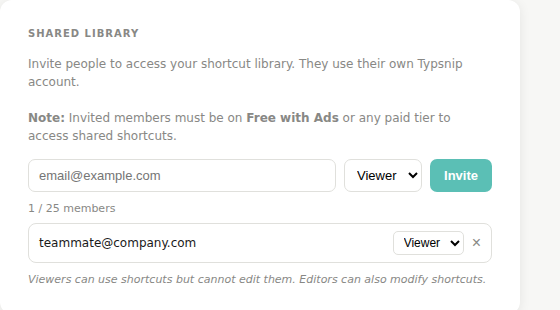
Secure library sharing (larger teams): The account owner invites individual employees by email. Each employee uses their own personal Typsnip account — they never see the login credentials. The owner controls who gets Viewer access (can use shortcuts but not edit) and who gets Editor access (can add and edit shortcuts). This is ideal when you want managers to control the template library while employees simply use it.
Hybrid approach (recommended for companies): Management team shares the account credentials across 10 devices — they can all create and manage shortcuts. Then they share the library with up to 25 (Pro Team) or 50 (Pro Enterprise) individual employees who get secure, read-only access with their own accounts. This gives you editorial control at the management level and clean, secure access for the rest of the team.
How do I share shortcuts with my team?
On a Pro Team or higher plan, open the editor and go to the Account tab. Scroll to the Shared Library section and enter your teammate's email address to invite them. You can assign them as a Viewer (they can use your shortcuts but not edit them) or an Editor (they can also modify shortcuts). Invited members need to be on the Free with Ads tier or higher to access the shared library. Their shared shortcuts appear in a separate section in the sidebar alongside their personal ones — shared shortcuts are highlighted with a purple tag so they're easy to tell apart.
Can I use tables in my shortcuts?
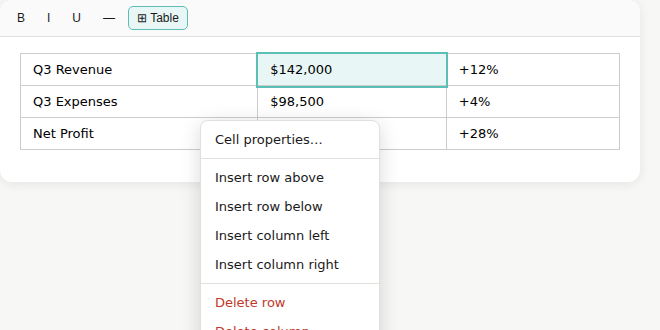
Yes. Click the table icon in the editor toolbar and drag over the grid to set the number of rows and columns. Once the table is inserted, right-click any cell to access a context menu where you can insert or delete rows and columns, or remove the entire table. For styling, right-click and choose Cell properties to set borders, background color, text color, alignment, and padding — and apply those styles to a single cell, an entire row, column, or the whole table at once.
What is the Expansion Format setting and which should I use?
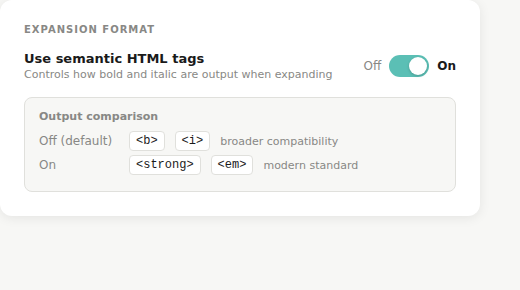
The Expansion Format setting controls which HTML tags Typsnip uses when expanding bold and italic text. You'll find it in the Account tab at the bottom.
Off (default) — uses <b> and <i> tags. These are the most broadly compatible and work well in Gmail, Outlook, and most web apps that accept rich text.
On — uses <strong> and <em> tags. These follow modern HTML standards and are preferred if your shortcuts are going into content management systems, web editors, or publishing tools.
For most users, leaving it Off is the right choice.
What are active sessions and how do I sign out of other devices?
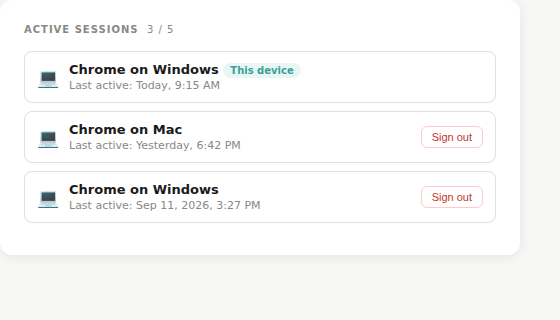
A session is one installation of Typsnip on one device. Every time you sign into Typsnip on a new browser or computer, a new session is created. Your plan determines how many active sessions you can have at once — for example, Pro allows 5 and Pro XL allows 10.
To see and manage your sessions, open the editor and go to the Account tab. You'll see a list of all active sessions showing the browser, device, and last active time. Click Sign out next to any session to remove it — useful if you've signed in on a public computer or want to free up a slot for a new device.
Sessions are different from shared shortcuts: sessions control how many devices you can use Typsnip on, while shared shortcuts control how many other people can access your library.
Stop retyping. Start Typsnipping.
Join the free tier today. No credit card. No commitment.